
Integrations
Connect AI providers, Twilio, Gmail, Outlook, and Google and Microsoft calendars to power your AI agents.
Objective
Connect the external services your agents depend on: AI providers (chat, RAG, text-to-speech, web search), Twilio for phone and WhatsApp, email accounts (Gmail, Outlook), and calendars (Google, Microsoft). Everything is presented as a marketplace of cards you connect, manage, and disconnect from one page.
Access
Sidebar -> Integrations Route: /app/{tenant}/integrations
Provider detail pages (opened from the cards):
- /app/{tenant}/integrations/gmail
- /app/{tenant}/integrations/outlook
- /app/{tenant}/integrations/calendar?provider=google
- /app/{tenant}/integrations/calendar?provider=microsoft
Roles
- owner, admin, agent
Prerequisites
- A verified email. Accounts pending verification are asked to confirm their email before any integration can be saved or connected.
- To connect Gmail or Outlook for sending email you need at least one agent with the Email channel enabled — you assign that agent while connecting the account.
- ElevenLabs and Deepgram keys only take effect once you select that provider in Voice Agents.
How the page works
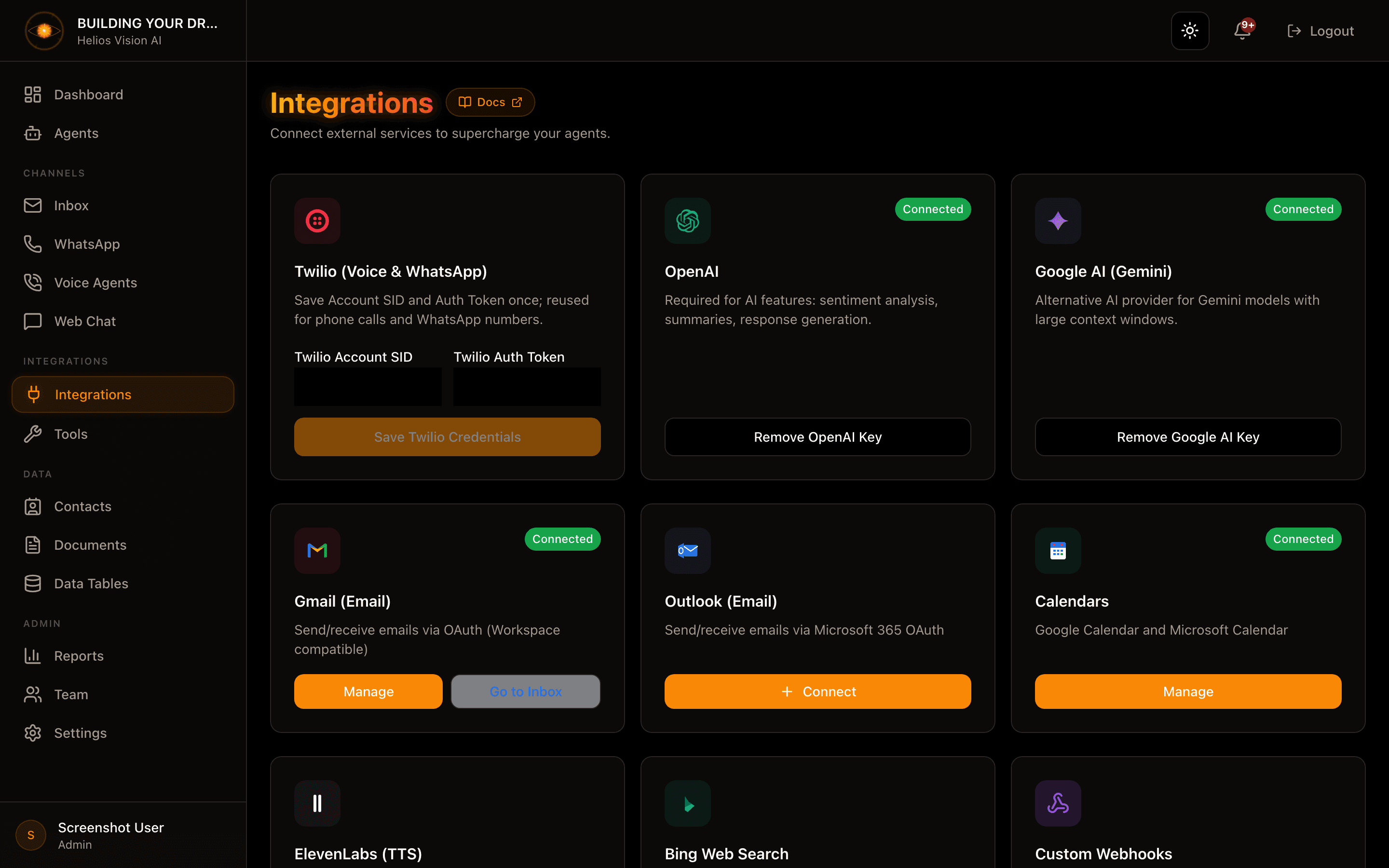
The page lists every integration as a card. Cards are split into two sections:
- Connected — integrations already set up, with a status badge.
- Available — integrations you can still connect.
Use the category chips and the search box to narrow the list. Category and search combine together.
| Control | Values | Note |
|---|---|---|
| Category chips | All, AI, Communication, Email, Calendars | Filters the cards by type |
| Search | free text | Matches integration name and description |
Click any card to open its detail dialog, where you enter the key, connect the account, or disconnect.
Status badges
| Badge | Meaning | What to do |
|---|---|---|
| Connected | Set up and working | Nothing |
| Action required | Connected but failing at runtime (for example, an AI account out of credit or a rejected key) | Fix the account, then re-check |
| Needs reconnection | Connected, but an account's sign-in expired | Reconnect the account |
AI providers
OpenAI
Powers chat responses and AI features (sentiment analysis, summaries, response generation).
| Field | Mandatory | Format | Note |
|---|---|---|---|
| OpenAI API Key | Yes | sk-... | From the OpenAI Platform |
Actions: Save OpenAI Key, Remove OpenAI Key.
When you save, the key is verified live with OpenAI:
- A key OpenAI rejects (invalid, revoked, or lacking chat permission) is not saved — fix it and try again.
- A valid key on an account with no funds is saved, but the card shows Action required and warns that AI features will fail silently until you add funds. Add funds in your OpenAI account, then use Re-check to confirm.
Google AI (Gemini)
Alternative AI provider with large context windows. Used for document search (RAG).
| Field | Mandatory | Format | Note |
|---|---|---|---|
| Google AI API Key | Yes | AIza... | From Google AI Studio |
Actions: Save Google AI Key, Remove Google AI Key.
ElevenLabs (TTS)
Premium voices for phone calls. Required when you select ElevenLabs as the voice provider in Voice Agents.
| Field | Mandatory | Format | Note |
|---|---|---|---|
| ElevenLabs API Key | Yes | elevenlabs_... | From the ElevenLabs Dashboard |
Actions: Save ElevenLabs Key, Remove ElevenLabs Key.
Deepgram Aura-2 (TTS)
Enterprise phone-quality voice (native 8kHz). Required when you select Deepgram as the voice provider. If removed, Voice Agents using Deepgram voices fall back to OpenAI.
| Field | Mandatory | Format | Note |
|---|---|---|---|
| Deepgram API Key | Yes | Project API Key | From the Deepgram Console |
Actions: Save Deepgram Key, Remove Deepgram Key.
Web Search
Enables the web search tool so agents can answer with fresh results from the web.
| Field | Mandatory | Format | Note |
|---|---|---|---|
| Web Search API Key | Yes | tvly-... | From Tavily |
Actions: Save Key, Remove Key.
The key is verified live before it is saved; a rejected key is not stored.
Communication
Twilio (Voice & WhatsApp)
Save your Twilio credentials once; they are reused for phone calls and WhatsApp numbers.
| Field | Mandatory | Format | Note |
|---|---|---|---|
| Twilio Account SID | Yes | Starts with AC, 34 characters | From the Twilio Console (Account Info panel) |
| Twilio Auth Token | Yes | 32 characters | From the Twilio Console (Account Info panel) |
Actions: Save Twilio Credentials, Disconnect Twilio.
The Auth Token (not an API Key) is required because it is used to verify that incoming webhook requests really come from Twilio.
Gmail (Email)
Send emails through Gmail via OAuth (Google Workspace compatible). You can connect multiple accounts.
- Opens /app/{tenant}/integrations/gmail.
- When connecting, choose the agent that will send email from this account (the agent must have the Email channel enabled). If you have no eligible agent yet, you are prompted to create one first.
- Card actions: Connect (when none connected), or Manage and Go to Inbox (when connected).
- If an account is missing the newer permission needed to sync labels and sent mail, the card shows a Reconnect required notice with a Reconnect Gmail action.
The number of email accounts you can connect depends on your plan. Reaching the limit shows a plan-limit prompt with an upgrade path.
Gmail Inbox
Reads incoming emails via Gmail so agents can work an inbox, not just send. This is an early-access feature rolled out gradually; the card only appears once it is enabled for your workspace — contact support if you want access.
Card actions: Connect Inbox (when not connected), or Go to Inbox and Reconnect (when connected).
Outlook (Email)
Send emails through Microsoft 365 / Outlook via OAuth. You can connect multiple accounts.
- Opens /app/{tenant}/integrations/outlook.
- When connecting, choose the agent that will send email from this account (the agent must have the Email channel enabled).
- Card actions: Connect (when none connected) or Manage (when connected).
The plan-based email-account limit applies here too.
Calendars
Google Calendar
Let AI agents check availability and create events on Google Calendar. You can connect multiple accounts.
- Opens /app/{tenant}/integrations/calendar?provider=google.
- Card actions: Connect (when none connected), Manage (when healthy), or Reconnect (when an account's sign-in expired).
Outlook Calendar
Let AI agents check availability and create events on Microsoft Calendar. You can connect multiple accounts.
- Opens /app/{tenant}/integrations/calendar?provider=microsoft.
- Card actions: Connect, Manage, or Reconnect, same as Google Calendar.
On the calendar page each connected account shows its status (Active, or Expired - reconnect) and its own disconnect control.
Good practices
- Connect an AI provider (OpenAI or Google AI) before creating agents, so responses work from the first message.
- Save Twilio once and reuse the same credentials across WhatsApp and Voice.
- After adding funds to a flagged OpenAI account, use Re-check instead of re-entering the key.
- Assign the right agent when connecting an email account — that agent is the one that will send on your behalf.
Common notes
- Credentials are encrypted and stored securely; API keys are never shown back after saving.
- Disconnecting a provider also removes any agent tools that depended on it; the confirmation reports how many were removed.
- A wrong OpenAI or Web Search key is rejected on save and never stored.
- Twilio rejects an Account SID that does not start with AC and have 34 characters, or an Auth Token that is not 32 characters.
- Verify your email first — restricted accounts cannot save keys or connect accounts.